From onboarding to monthly auto-submission — a practical walkthrough of how Hubble handles SGBuildex CPD submission for site admins, QS, and project managers.
In Brief
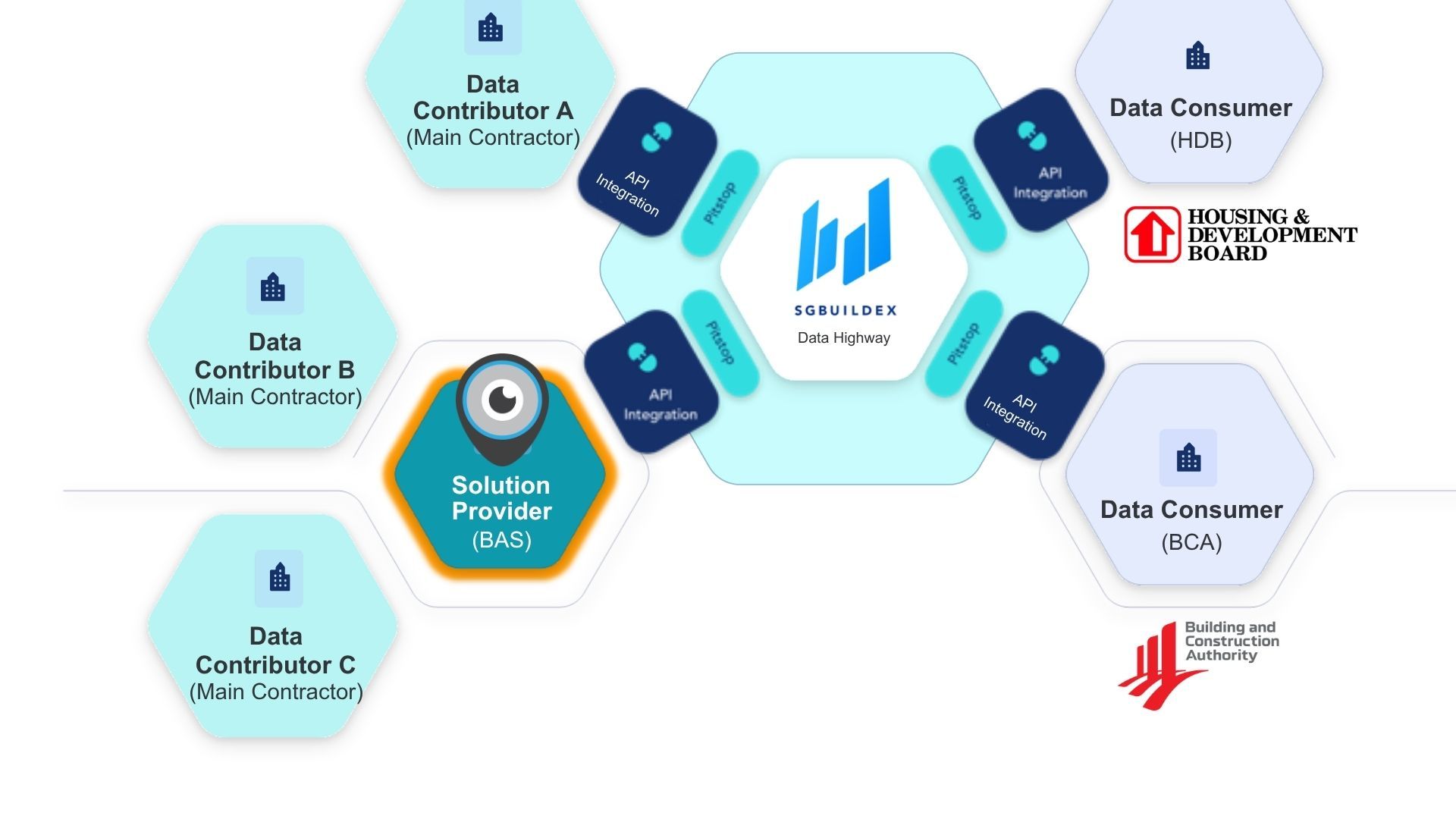
Hubble's SGBuildex CPD Module connects your site biometric check-in data directly to BCA, HDB, and other reporting agencies via SGBuildex. Workers check in and out through Hubble — FRBAS-integrated turnstiles or gantries, mobile app with biometric check-in/outs, or both. On a fixed monthly schedule, Hubble transmits the attendance data to BCA automatically.
Site admins, QS, and project managers review and correct records via the Hubble dashboard before each submission. All activity is logged in Hubble's Activity Log for audit purposes.
What the module does — and what it sits on top of
The SGBuildex CPD Module is an add-on to Hubble Workforce — the platform's workforce management system, which handles site biometric attendance, manpower management, access control, and the existing ePSS module.
Activating the SGBuildex CPD Module does not replace what Hubble Workforce already does. It adds the SGBuildex API connection on top — so attendance data that was already being captured through your site Biometric Authentication System (BAS) now flows automatically to BCA as Construction Productivity Data (CPD) submission each month, rather than requiring manual export and portal upload.
For contractors already using Hubble's ePSS, the upgrade is a module activation — worker data, project setup, and the existing BAS connection are already in place. ePSS continues running in parallel for non-mandated projects.
Onboarding — what happens before go-live
Onboarding has two parallel tracks that both need to complete before the first live submission: Hubble's setup on your side, and BCA's own SGBuildex registration process.
- [One-time] Hardware compatibility check
- Hubble confirms whether your existing turnstiles and biometric scanners are compatible. Where they are, the connection is made without hardware replacement. Where they are not, Hubble recommends suitable alternatives. If you are using Hubble's mobile app instead of or alongside fixed hardware, the site admin sets up the polygon geofence at this stage.
- Hubble confirms whether your existing turnstiles and biometric scanners are compatible. Where they are, the connection is made without hardware replacement. Where they are not, Hubble recommends suitable alternatives. If you are using Hubble's mobile app instead of or alongside fixed hardware, the site admin sets up the polygon geofence at this stage.
- [One-time] Data consent signing
- A one-time data consent agreement between your company, Hubble, and BCA authorises the transmission of worker attendance data to SGBuildex. This is required before any data can be sent.
- A one-time data consent agreement between your company, Hubble, and BCA authorises the transmission of worker attendance data to SGBuildex. This is required before any data can be sent.
- [One-time] Active worker import
- Your current active worker list is imported into Hubble. This is the worker data that powers both the Workforce module and the SGBuildex CPD Module.
- Your current active worker list is imported into Hubble. This is the worker data that powers both the Workforce module and the SGBuildex CPD Module.
- [One-time] Trade mapping
- Your existing trade codes and ePSS classifications are mapped to BCA's new 30-category SGBuildex trade list. This is a one-time exercise done at setup. After this point, all worker trade assignments use the new list directly.
- Your existing trade codes and ePSS classifications are mapped to BCA's new 30-category SGBuildex trade list. This is a one-time exercise done at setup. After this point, all worker trade assignments use the new list directly.
- [One-time] Test submission
- A test transmission to SGBuildex verifies the end-to-end connection before the module goes live. This confirms that data flows correctly from your site BAS through Hubble to BCA's system.
- A test transmission to SGBuildex verifies the end-to-end connection before the module goes live. This confirms that data flows correctly from your site BAS through Hubble to BCA's system.
- [Runs in parallel] BCA and SGBuildex registration
- Separately from Hubble's onboarding, builders register with BCA to onboard SGBuildex at go.gov.sg/automated-cpd-registration. BCA follows up with the steps to complete the SGBuildex onboarding. Both tracks need to be complete before the first live submission.
How long does onboarding take?
For a new project onto Hubble, onboarding takes 30 days. For existing Hubble Workforce customers, it is even faster since worker data and project setup are already in the system. Factor in BCA's processing time on the registration side — both tracks running in parallel gives you the best chance of meeting your target go-live date.
The monthly submission cycle
Once live, Hubble's SGBuildex CPD Module runs on a fixed monthly schedule.
During the month
Attendance captured
Workers check in and out through gantries integrated with facial recognition biometric authentication system (FRBAS), mobile app with biometric attendance taking, or both. Data is recorded in Hubble in real time.
Before submission
Review on dashboard
Site admin, Quantity Surveyor, and project manager review attendance records and trade assignments via the Hubble dashboard. Corrections are made before the submission window closes.
Submission date
Auto-submit via SGBuildex
On the submission date, Hubble transmits the data to BCA via the SGBuildex API automatically. No manual upload. No portal login.
After submission
Activity log updated
The successful submission is recorded in Hubble's Activity Log as a digital audit trail of what was submitted, and when.
Who does what — roles in the platform
Three roles typically use the SGBuildex CPD Module, each with a different focus within the Hubble dashboard:
Site Admin
- Registers new workers and subcontractors on the BAS
- Manages trade assignments and updates as deployment shifts
- Reviews attendance records before each submission
- Flags and corrects incomplete or incorrect records
- Manages geofence configuration for mobile check-in sites
Quantity Surveyor (QS)
- Monitors manpower productivity data by trade
- Verifies trade accuracy against deployment plan
- Reviews manpower totals before submission
- Cross-references CPD data with internal labour records
Project Manager
- Oversight of submission status across active projects
- Reviews Activity Log for submission history
- Approves or escalates flagged issues before submission
- Monitors compliance status ahead of clearance applications
Managing trade data during the project
Trade management does not stop at onboarding. As workers join, leave, or shift roles during the project, trade assignments need to stay current.
- New workers — registered directly against BCA's 30-category list, no ePSS code translation needed
- Multi-skilled workers — trade assignment updated individually when deployment changes; the next submission reflects the updated trade
- Trade changes are not retroactive — updating a trade applies from the next submission cycle forward, not to previously submitted records
In Hubble, both individual and bulk trade assignments can be updated easily without re-uploading the entire worker list. Only the specific workers’ records need to change.
Handling exceptions
Real site conditions produce exceptions — missed check-outs, workers added to site without registration, hardware going offline. The SGBuildex CPD Module with Hubble Workforce is designed to handle the most common ones without requiring manual intervention for every case.
- Missed check-outs — Hubble applies an automatic end-of-day checkout for workers who have not clocked out, enforcing a hard cutoff at the end of the working day. That said, builders have the responsibility to ensure that workers check in and out as standard practice for attendance accuracy, and should only use this when manual checkout has not occurred.
- Hardware downtime — the Hubble App provides a parallel check-in option; data from mobile and fixed BAS merges automatically with no reconciliation needed
- Duplicate records — every worker is tied to a unique identity in Hubble; duplicate attendance records for the same worker within the same project cannot be generated
Exceptions that cannot be auto-resolved surface in the dashboard review window before each submission, giving the site admin the opportunity to correct them before data reaches BCA.
The audit trail
Every submission is logged in Hubble's Activity Log — a timestamped record of what was submitted, and when. This provides a complete digital audit trail for compliance purposes, accessible to the project manager and site admin at any time.
BCA reminds builders that CPD submissions must be complete and accurate before applying for as-built Buildability and Constructability clearance. The Activity Log is the evidence trail that supports that application.
Already on Hubble Workforce or ePSS?
If your site is already running Hubble Workforce, activating the SGBuildex CPD Module does not require re-onboarding. Your hardware connection, worker data, and project setup are already in the system. The activation process is a module switch and a one-time trade re-mapping to BCA's 30-category list.
ePSS continues running in parallel for projects not covered by the automated CPD mandate — there is no need to choose between the two modules.
See it in practice before you decide.
Book a 30-minute walkthrough and we'll show you the dashboard, the submission cycle, and how the trade setup works for your specific project portfolio.
Related
Share this article
Explore Related Content
Stay up to date with our latest news features!

CPD Trade Data for SGBuildex — Mapping, Multi-Skilled Workers, and Mid-Project Changes

Mobile Biometric Check-In for SGBuildex CPD — Open Sites, Space Constraints, and Business Continuity