Mobile Biometric Check-In for SGBuildex CPD — Open Sites, Space Constraints, and Business Continuity
Not every construction site can run fixed turnstiles. Hubble's biometric-integrated mobile app supports SGBuildex CPD submission for open sites, space-constrained worksites, and as a backup when hardware goes down — on the same pipeline, with no separate workflow.
Short Answer
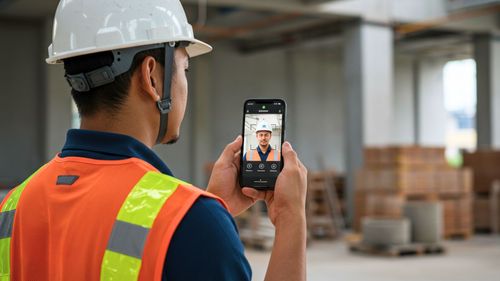
Hubble's mobile app with FRBAS (Facial Recognition Biometric Authentication System) captures worker check-in and check-out via smartphone, validated against a GPS polygon geofence configured to the site boundary. It is available on iOS and Android.
Data from mobile check-in flows through the same Hubble to BCA pipeline as fixed BAS — same trade mapping, same review window, same auto-submit, same audit trail. No separate submission workflow, no manual reconciliation with fixed BAS data.
Three situations where mobile check-in solves a real problem
🏗️ Open sites without fixed gantries
Linear infrastructure, road works, and sites with multiple access points where installing fixed turnstiles is impractical or impossible. Mobile check-in replaces the gate entirely.
📐Space-constrained worksites
Sites where the working area shifts as construction progresses — and relocating a physical BAS gate repeatedly is operationally disruptive. Mobile check-in can cover the areas a fixed gate does not reach, working alongside it.
🔄 Business continuity
When fixed BAS hardware loses connectivity, workers can check in via the mobile app. Data merges automatically into the same submission — no manual reconciliation needed when the system comes back online.
Mixed modes of check-in, same pipeline — no separate workflow
The core concern contractors raise about mobile check-in is whether it creates a parallel data stream that needs to be separately managed and submitted. It does not.
Whether a worker checks in through a fixed turnstile or the mobile app, the attendance record enters the same Hubble system and goes through the same process before reaching BCA:
Mobile and fixed BAS → same path to BCA
Check-in via mobile or fixed BAS → Trades applied → Review window → Auto-submit to BCA via SGBuildex → Audit trail and submission confirmation
All the same, regardless of how the worker checked in.
For sites running both fixed BAS and mobile check-in simultaneously, data from both sources combines in Hubble without any manual reconciliation step.
The submission reflects the complete picture of who was on site.
GPS polygon geofencing — how the site boundary works
Mobile check-in is validated against a site geofence — a GPS boundary that defines where a worker must physically be for a check-in to be accepted. This prevents check-ins from workers who are not actually on site.
Hubble uses polygon geofencing rather than a simple radius from a central point.
This distinction matters in practice:
| Radius-based geofence | Polygon geofence — Hubble |
|---|---|
Circle from a centre point
| Boundary follows the site shape Defined by multiple GPS coordinates that trace the actual site perimeter.
|
Site admin control
The polygon geofence is configured and managed by the site administrator directly in Hubble — not a fixed boundary set during onboarding.
As the site boundary changes during construction, the admin can redraw the geofence to reflect the current working area. This is particularly relevant for linear projects or projects with shifting active work zones at different stages over time.
How it handles space-constrained sites
On sites where the working area shifts as construction progresses — internal fit-out moving floor by floor, for example, or civil works advancing along a route — relocating a physical BAS turnstile repeatedly is operationally disruptive and sometimes impractical.
Mobile check-in can work alongside the fixed gate, extending coverage to areas the gate does not reach.
Workers in those areas check in via the app; workers passing through the fixed gate check in as normal.
Both data streams merge automatically in Hubble, and the combined attendance record feeds into a single CPD submission.
The geofence is updated by the site admin as the active work zone moves — so the boundary always reflects where workers are actually permitted to be.
Business continuity — when fixed hardware goes down
Fixed BAS hardware — turnstiles, biometric scanners, network connectivity — can go offline. When that happens on a site without a backup, attendance data for that period is lost and cannot be reconstructed accurately after the fact.
With Hubble's mobile check-in as backup, workers continue checking in via the app when the fixed system is unavailable. When the fixed system comes back online, there is no reconciliation step — data from both sources is already in Hubble, and the submission reflects the complete attendance record for the period.
CPD data gaps are a compliance risk
Periods of hardware downtime that are not covered by an alternative check-in method create gaps in the CPD record. BCA reminds builders that CPD submissions must be complete and accurate before applying for as-built Buildability and Constructability clearance. A gap discovered at that stage is significantly harder to resolve than one caught during the monthly review window.
Practical setup
Mobile check-in is available as part of Hubble Workforce on both iOS and Android. Setup involves:
- Configuring the polygon geofence for the site — done by the site admin, adjustable at any time
- Workers downloading the Hubble app and completing facial recognition enrolment
- No additional hardware required beyond the workers' own smartphones
For sites adding mobile check-in as a supplement to existing fixed BAS, the setup is additive — no changes to the fixed system are required.
Running an open site or infrastructure project?
Talk to us about how mobile FRBAS works for your site type and how it connects to your SGBuildex CPD submission.
Related
Share this article
Explore Related Content
Stay up to date with our latest news features!

CPD Trade Data for SGBuildex — Mapping, Multi-Skilled Workers, and Mid-Project Changes
Mobile Biometric Check-In for SGBuildex CPD — Open Sites, Space Constraints, and Business Continuity